5 ergonomic gains with double monitor mounts

Written by Bas Hellendoorn 

Published on februari 24, 2026

Poor screen height is one of the main causes of neck pain at work. Many desks are still set up without adjustability, which leads to static strain every day. If you work with two screens, misalignment quickly doubles that strain. 


Double monitor mounts solve this by letting you position both screens at eye level and shoulder width. With the right setup, you reduce pressure on your neck and create space for better focus.

The problem: static strain from dual screens

Working with two monitors often forces your head to turn too far to one side. This repeated rotation can overload the neck muscles within hours. When screens are too low, you automatically bend forward. That forward head posture increases pressure on your spine. Over time, this leads to stiffness, headaches, and lower energy levels. Many fixed stands do not support flexible positioning. 


They lack gas springs, which means you cannot smoothly adjust height and depth. Alberenz designs focus on minimalist design, so your desk stays calm and structured. The built-in gas springs allow controlled movement without effort. You also get a 5 year warranty, which supports long-term workplace health.

How to set up double screens the right way

Place both monitors directly in front of you at eye level. The top of each screen should align slightly below horizontal eye height. Keep the primary screen centered and the second one close beside it. Adjust the depth so your elbows remain at a 90 degree angle. Make sure your shoulders stay relaxed while typing.


When your head stays upright, your breathing improves. Better breathing supports oxygen flow and mental clarity. Reduced muscle tension helps you stay productive for longer blocks of time. Small ergonomic improvements often result in fewer afternoon energy dips. This is how a technical adjustment supports your daily health.

Alt image

The technical solution: controlled movement with gas springs

A gas spring system allows precise height adjustment. This prevents the micro-strain that builds up when screens are slightly misaligned. With dual setups, balance and stability are key. Strong steel construction keeps both monitors secure. Smooth movement means you adapt your setup within seconds.


Alberenz focuses on durable materials and clean design. The minimalist frame reduces visual clutter on your desk. Integrated cable management keeps wires out of sight. The 5 year warranty confirms product reliability. You invest once and support your posture for years.

Practical installation and daily use

Start by mounting the clamp securely to your desk edge. Attach both screens according to the weight guidelines. Adjust height so your gaze lands naturally on the center of the screens. Fine-tune the tilt to avoid glare from windows. Test the movement to ensure smooth repositioning during the day.


Changing posture during the day supports circulation. Alternating between tasks becomes easier when screens move with you. You reduce shoulder stiffness by keeping alignment symmetrical. Over weeks, this lowers the risk of chronic discomfort. Double monitor mounts.

The daily benefit: more space and mental clarity

Desk clutter increases cognitive overload. When monitors sit on large fixed stands, they consume valuable workspace. This limits arm movement and creates visual chaos. Lifting screens frees up surface area instantly. More space leads to calmer workflows.


Alberenz combines stability with sleek aesthetics. Gas springs make micro-adjustments effortless during meetings or design work. The structured frame keeps cables organized. The long warranty period reflects durable engineering. You create a setup that supports both performance and comfort.

From setup to sustainable energy

A well-aligned dual setup reduces unconscious muscle tension. Lower tension means less fatigue at the end of the day. When your workspace feels balanced, your mind follows. Productivity increases when discomfort decreases. Ergonomics becomes a daily energy strategy.

Balanced screen alignment reduces neck rotation and supports symmetrical posture. This lowers muscle overload during long sessions.

Gas spring adjustment allows smooth height and depth control. This supports active posture changes throughout the day.

Minimalist design keeps your desk visually calm. A clean workspace improves concentration and workflow clarity.

Integrated cable management prevents tangling and distraction. Organized cables increase safety and efficiency.

FAQ

How do double monitor mounts reduce neck pain?
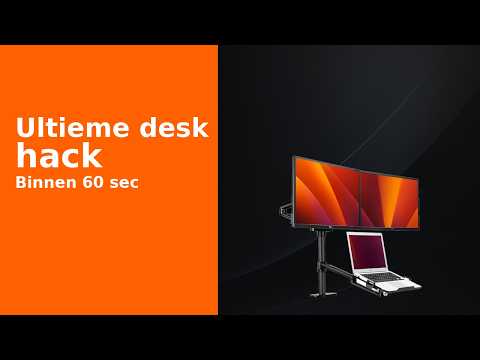
They reduce neck pain by aligning both screens at eye level. This prevents constant downward bending. It also limits extreme head rotation. Balanced positioning distributes muscular load evenly. Over time, this lowers daily strain.

Why are gas springs important in dual setups?

Gas springs allow smooth and precise height adjustment. This helps you adapt the setup to your body. Without them, adjustments are limited and stiff. Easy movement encourages frequent posture changes. That flexibility supports long-term comfort.

When should you switch to a dual mount system?

You should switch when you use two screens daily for several hours. Static stands often limit ergonomic alignment. If you feel neck or shoulder tension, your setup may be too rigid. A mount system allows personal adjustment. Early adaptation prevents chronic discomfort.

Difference between fixed stands and adjustable mounts?

Fixed stands keep screens at one height. Adjustable mounts allow dynamic positioning. Dynamic setups reduce static muscle load. Mounts also free up desk space. This creates a more structured workspace.

What cost can you expect for quality mounts?

Quality mounts cost more than basic stands. However, durable steel and gas spring systems justify the price. A 5 year warranty reflects product lifespan. Reduced discomfort can lower indirect health costs. It becomes a long-term workplace investment.

Upgrade your dual workspace today

Working with two screens should support your productivity, not harm your posture. Small ergonomic corrections create measurable physical relief. A balanced setup protects your neck and shoulders. It also clears visual space for focused work. Your desk becomes a performance tool instead of a stress factor.


When you invest in structured movement, you invest in daily energy. Dual screen alignment supports breathing, posture, and mental clarity. The right system adapts to your workflow instead of limiting it. Comfort and design can work together in one solution. Double monitor mounts.